
What should brands look for in an AI commerce platform?
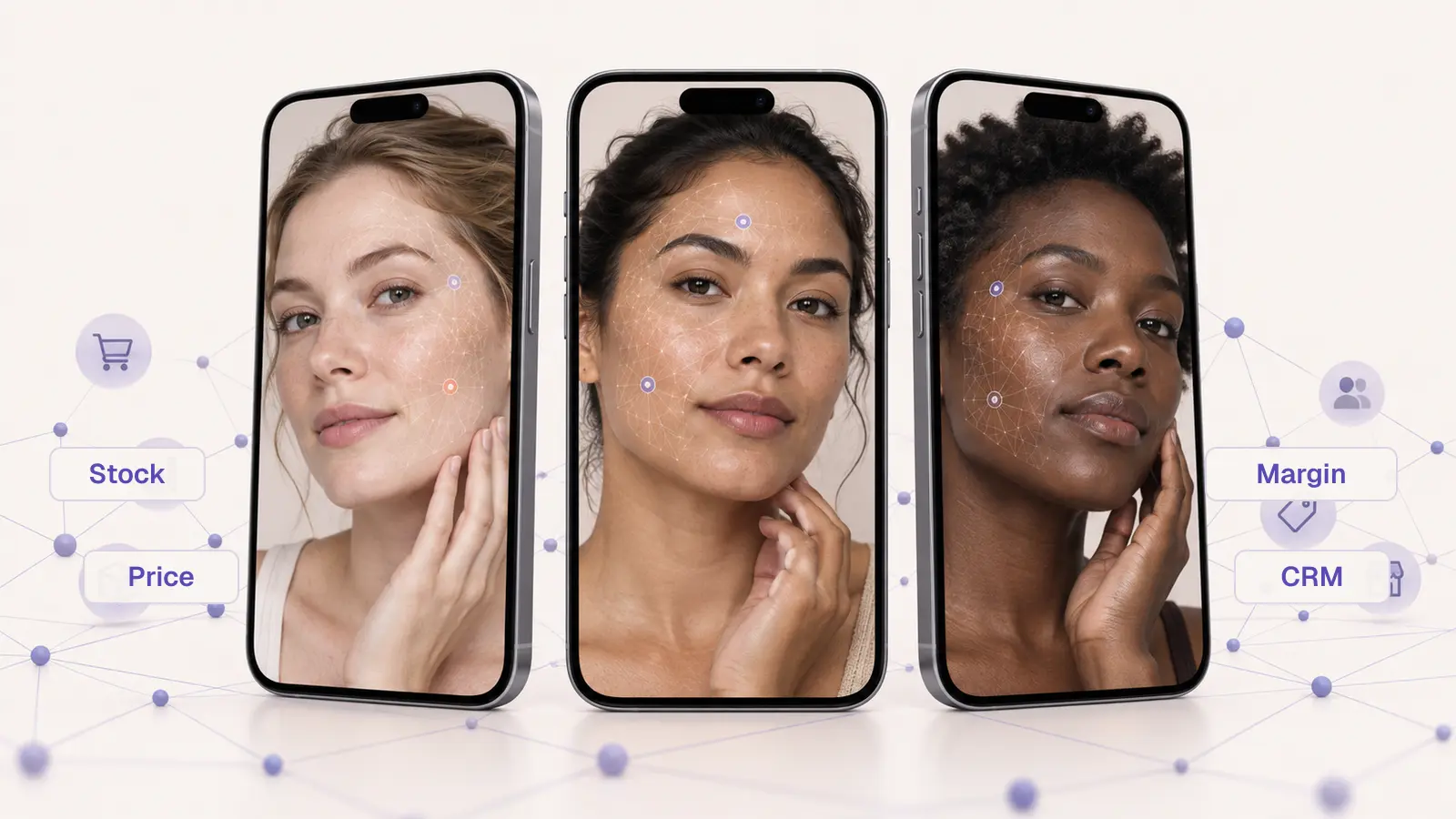
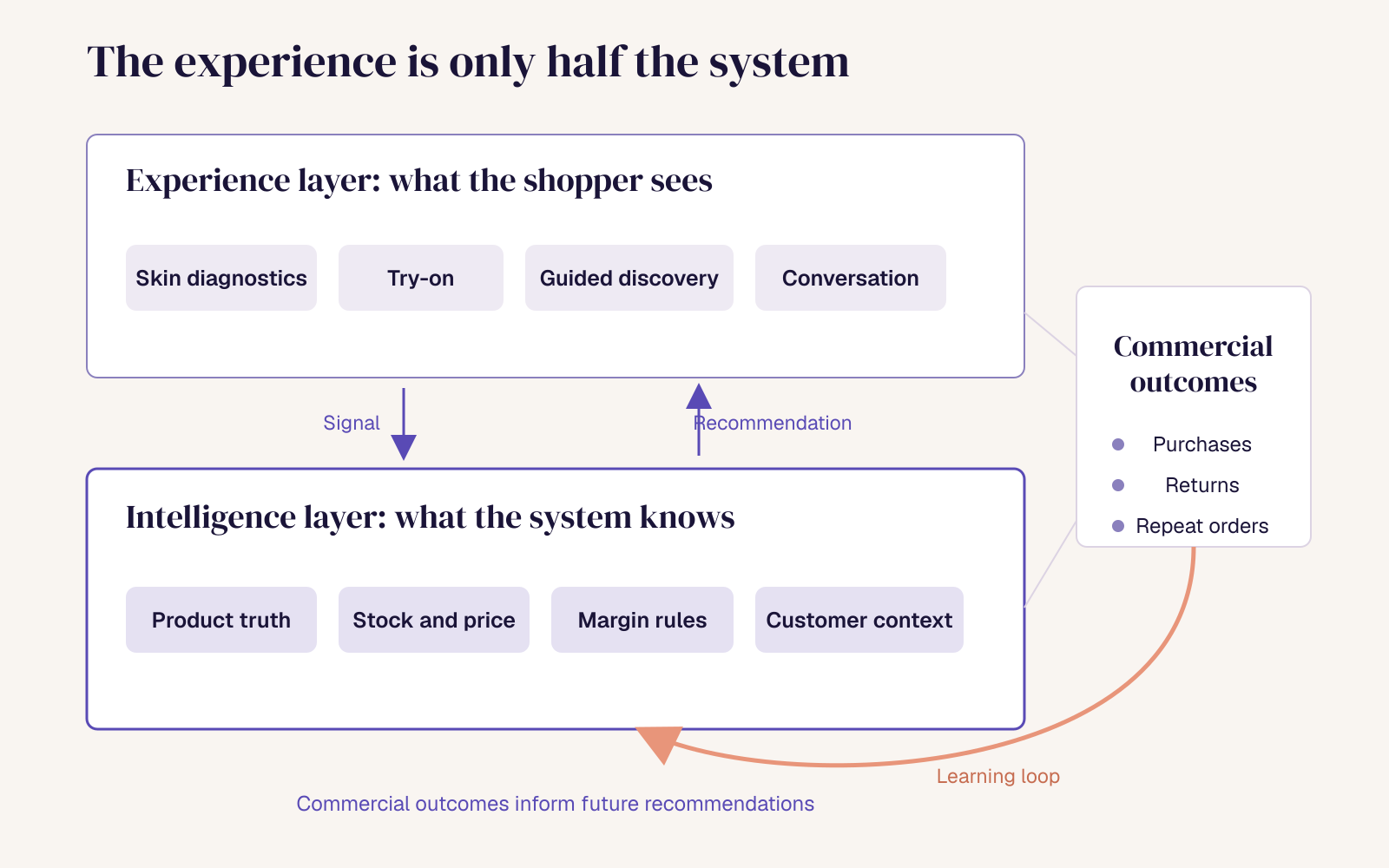
Brands should evaluate two things together: the shopper experience the platform creates, such as camera-based diagnostics, virtual try-on and conversational discovery, and the commerce intelligence behind it, meaning catalogue, inventory, pricing, margin and customer data. The strongest platforms connect both, so every interaction produces first-party signal that improves recommendations, merchandising and retention over time.
Why do AI commerce evaluations go wrong?
Most evaluations start with the most visible feature. Who has the most realistic try-on? Who offers a skin scan? Who can launch a shopping assistant fastest? Whose demo is the most impressive?
Those are fair questions, but they measure the surface. A demo runs on a curated product set, ideal lighting and a flagship phone. Your shoppers arrive with mid-range devices, a catalogue of thousands of SKUs that changes weekly, and questions a demo script never anticipated.
The stakes have risen. Retail AI is moving from service automation into selling. In NVIDIA’s 2026 survey, 20% of retail and CPG respondents already have active AI agents and a further 21% plan to deploy within a year. Salesforce found that shoppers referred from AI search converted nine times more often than those arriving from social during the 2025 holiday season. Brands will choose a platform in the next 12 to 18 months whether they plan to or not. The question is whether they choose on the demo or on the system.
Start with the customer problem, not the technology
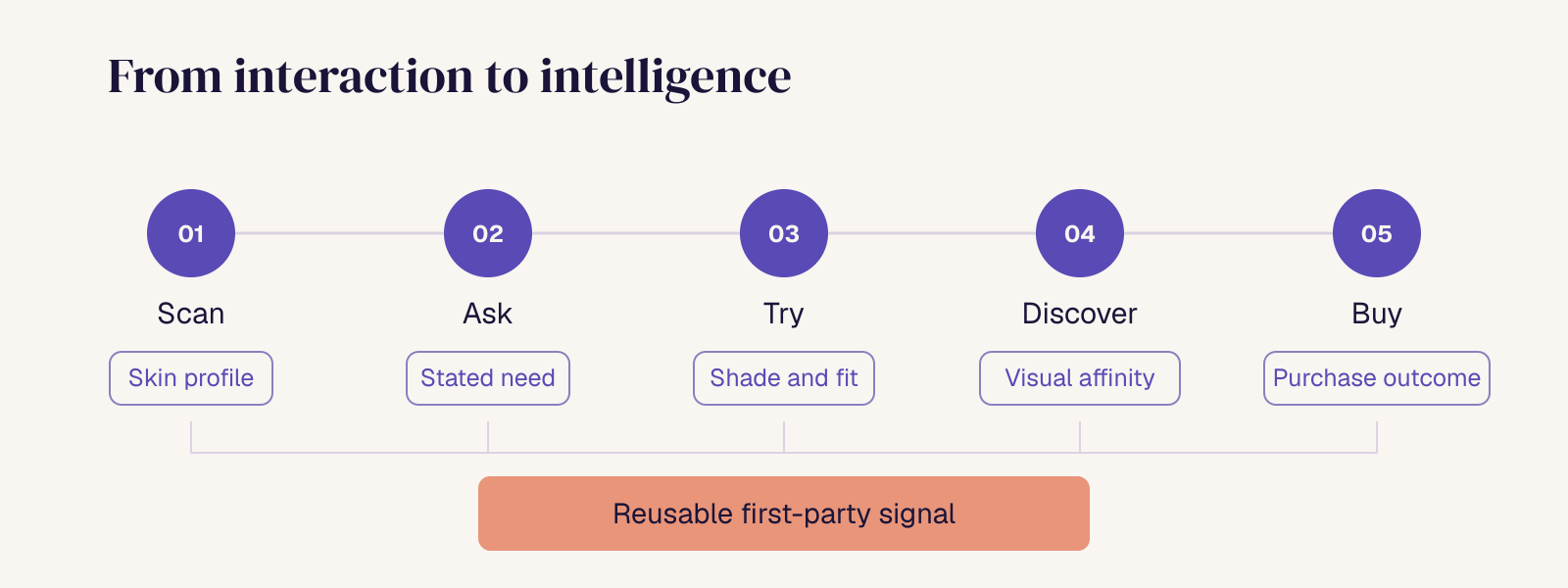
Before comparing vendors, define the journey you need to improve. For beauty and fashion, it usually follows five steps: Scan → Ask → Try → Discover → Buy.
Then answer four questions:
- Where does discovery break today? Search abandonment, shade uncertainty, choice overload and returns are the usual places.
- What can shoppers not express through search and filters? Skin concerns, undertone, fit, mood and occasion are common gaps.
- What context must the system understand to help?
- Which action should become easier, faster or more confident?
If a vendor cannot map its product to your answers, the demo does not matter.
What is camera-native commerce, and how is it different from agentic commerce?
The categories are new and the vocabulary is loose. Fix the definitions before you compare vendors.
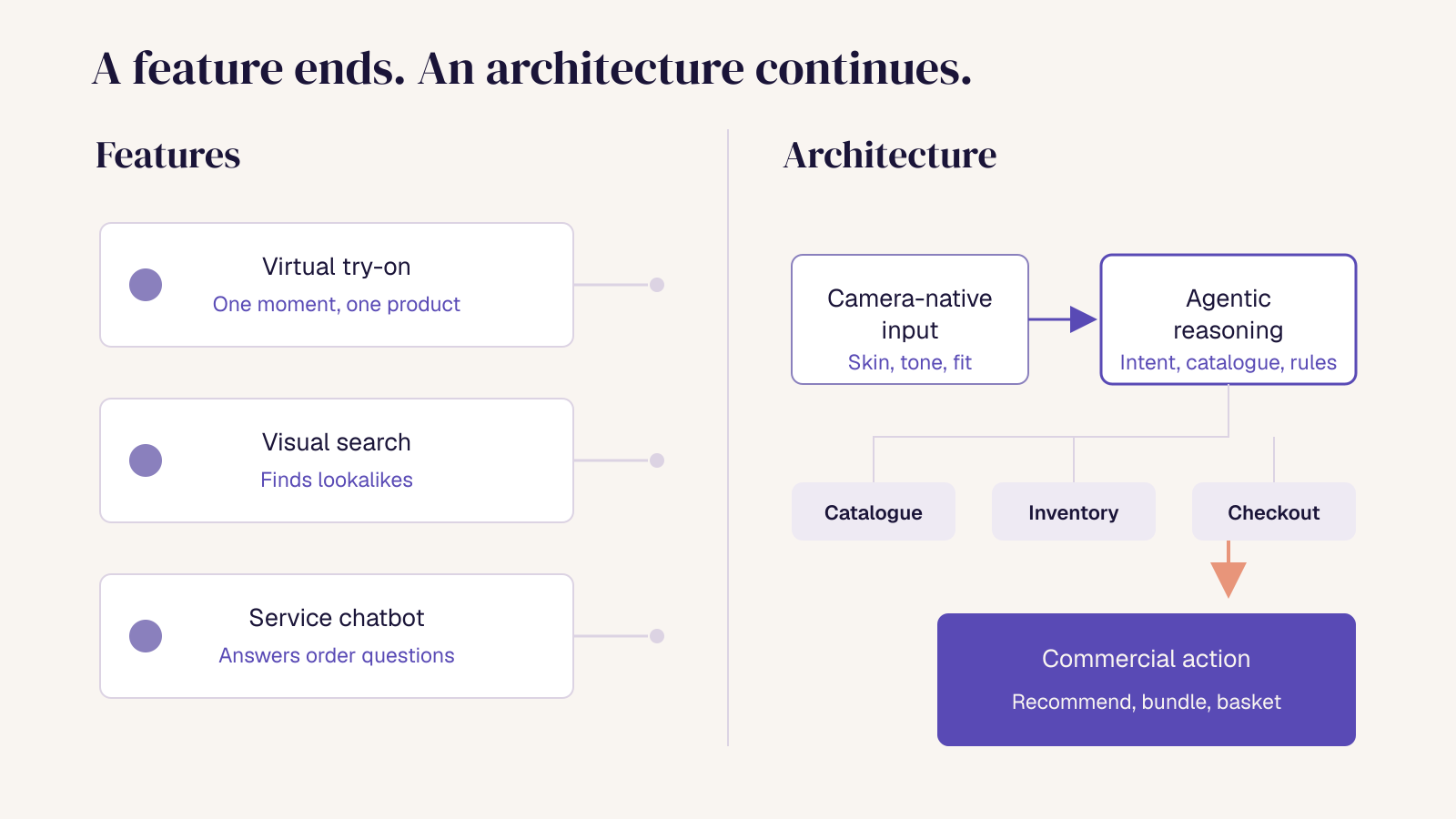
Camera-native commerce is a commerce architecture in which the camera acts as a persistent input layer. Vision-derived signal, such as skin condition, tone or fit, informs every stage of the session and connects to catalogue, reasoning and checkout. The camera is not a single try-on feature on a product page.
Agentic commerce is commerce in which AI agents interpret intent, reason across product and commercial data, and take actions within rules the brand sets. Those actions include recommending, comparing, bundling, adding to basket or triggering a follow-up. For how shopping moved from search to social to agents, see From Search to Discovery to Agents.
It helps to be clear about what neither of these is:
- Virtual try-on is a feature. It renders a product on the shopper at one point in the journey.
- Visual search retrieves similar-looking products from an image.
- A customer-service chatbot answers questions about orders, delivery and returns. It does not help a shopper decide what to buy.
Why they matter more together: the camera tells the system who the shopper is and what suits them, and the agent layer decides what to do about it commercially. Each is useful on its own. Connected, one produces the evidence and the other acts on it.
How do you evaluate the shopper experience?
This is the half every vendor will show you. Test it on your terms.
- Camera access across the journey. Can shoppers use the camera wherever uncertainty arises, or only inside one modal?
- Diagnostics versus overlays. Does the camera measure something, such as visible skin indicators, undertone or face shape, or does it only render a product on top of the image? Diagnostic signals add evidence of fit that behavioural data cannot.
- Accuracy across skin tones, lighting and devices. Ask for results across the full range of your customers’ skin tones, in poor lighting, on mid-range Android phones. Shade-sensitive categories expose weak models fastest.
- Conversational and guided discovery. Can shoppers describe a need in their own words, or through visual preference such as swiping, when they lack the vocabulary?
- Combining signals. Can the system use what the camera sees together with what the shopper says?
- Explainability. Can it tell the shopper why a product was recommended?
- Performance. Check load time, latency and drop-off on mobile.
- Shopper control and accessibility. Shoppers should be able to skip the camera, change direction and make the final decision themselves.
- Path to purchase. Does a recommendation move directly to basket, bundle or checkout?
How do you evaluate the commerce intelligence behind the experience?
This is the half most evaluations skip, and where most platforms are thinnest. A shopping assistant that speaks fluently but does not understand your catalogue is still a chatbot.
Test whether the system understands:
- Product truth: ingredients, attributes, claims, shades, sizes and use cases. In Salsify’s 2026 research, 31% of shoppers said detailed product information most helped them trust AI recommendations.
- Live commercial context: availability, price, promotions and delivery cut-offs.
- Merchandising and margin rules: what should be prioritised, protected or never recommended.
- Customer context: purchase history, loyalty status and replenishment timing, used with consent.
- Commercial priorities: campaigns, launches and partner commitments.
- Autonomy boundaries: which actions an agent can take on its own, and which require human approval.
The key question is whether the intelligence stops at the recommendation, or whether it can inform the rest of the commercial system.
Does the platform learn, or does every session start from zero?
This is the clearest dividing line between a point solution and a platform. Ask:
- What signals are captured from each interaction, and in what structure?
- Can a skin scan today shape discovery, CRM and retention next month?
- Can visual preference behaviour, such as swiping, improve product matching?
- Do commercial outcomes, such as purchases, returns and repeat orders, feed back into future recommendations?
- Can your teams inspect why a recommendation or action was made?
Most try-on deployments throw this signal away when the session ends. We covered what that costs in The Real ROI of AR Try-On.
Point solution versus commerce platform
- Scope: a point solution solves one interaction; a platform connects the journey.
- Output: a point solution produces an output; a platform produces reusable signal.
- Integration: a point solution operates as a widget; a platform connects to catalogue and commercial systems.
- Measurement: a point solution is measured on feature engagement; a platform on commercial and customer outcomes.
- Lifespan: a point solution is replaced when the campaign ends; a platform expands across use cases and seasons.
What data, integration and ownership questions matter most?
These questions decide whether a pilot can scale, and they are rarely raised in the first meeting:
- Catalogue and PIM: how product data is ingested, enriched and kept current.
- Ecommerce stack: cart and checkout integration with your platform.
- Feeds: inventory, pricing and promotions, and how often they refresh.
- CRM, loyalty and analytics: where the signal goes and in what format.
- Consent for visual data: facial and skin imagery is sensitive, so check the consent basis, whether processing happens on-device or in the cloud, and whether images are stored.
- Retention and deletion: how long data is kept and how shoppers remove it.
- Model training: whether your customers’ data trains models used for other brands.
- Portability: what you keep, and in what form, if you leave.
What questions should you ask an AI commerce vendor?
These are the twelve questions that separate a strong demo from a deployable system:
- Show us the experience using our products, our data and mid-range phones.
- What percentage of our catalogue can realistically go live in 90 days?
- What happens when a product, shade or formulation changes?
- Can the system explain why it recommended a specific product?
- Does it know whether that product is in stock and commercially appropriate?
- Where does the signal go after the shopper leaves?
- Can CRM, merchandising and retention teams use that signal?
- What data is stored, and under what consent basis?
- Which decisions can the agents make without human approval?
- How are recommendations audited and controlled?
- What costs appear after the initial implementation?
- What happens to our data if we leave?
A vendor that answers all twelve clearly is selling a system. A vendor that steers back to the demo is selling a feature.
How do you design an AI commerce pilot that answers a real question?
A pilot should test the system, not prove that the feature works.
Pilot design
- One defined customer problem, such as foundation shade matching or gifting.
- A representative product set, not a curated best-case selection.
- Real catalogue, pricing and availability data.
- A control group or benchmark.
- Success and kill criteria agreed before launch.
- A documented route from pilot to repeatable deployment.
Pilot metrics
- Time to decision.
- Product engagement and add-to-basket rate.
- Conversion, AOV and bundle attachment.
- Return and mismatch indicators.
- Repeat interaction.
- Signal quality, measured in three parts: consent rate, the share of sessions that produce a reusable shopper profile, and the share of those profiles activated downstream in CRM, merchandising or retention.
What should be on an AI commerce platform selection checklist?
A good selection checklist covers three layers: the shopper experience, the commerce intelligence behind it, and the operating foundations that decide whether a pilot can scale. Use these 18 criteria to compare your shortlist, and ask to see each one demonstrated with your own products and data.
Experience layer
- Works on mid-range phones and in everyday lighting, not only in the demo.
- The camera measures something, such as skin indicators, undertone or fit, rather than only overlaying products.
- Accuracy is shown across the full range of your customers’ skin tones.
- Shoppers can skip the camera and still get guidance.
- Every recommendation leads straight to basket, bundle or checkout.
Intelligence layer
- Combines what the camera sees with what the shopper says.
- Explains why each product was recommended.
- Reads your product truth: ingredients, shades, claims and use cases.
- Knows live stock, price and promotions.
- Follows your merchandising and margin rules.
Operating foundations
- Connects to your PIM, ecommerce platform and CRM without a custom rebuild.
- Stores each session’s signal in a structured form your teams can reuse.
- Has a clear consent basis for visual data, with defined retention and deletion.
- Is transparent about whether your data trains models used for other brands.
- Lets you set which actions agents can take without human approval.
- Reports commercial outcomes against a control, not only engagement.
- Agrees success and kill criteria before a pilot starts.
- Discloses costs beyond the initial implementation, and what happens to your data if you leave.
A vendor that ticks the experience items but few of the intelligence items is offering a point solution, however good the demo.
Download the checklist as a one-page PDF to fill in or print for your next vendor review.
What are you actually choosing?
You are not choosing a camera feature or adding another chatbot. You are deciding how your commerce environment will understand shopper intent, turn it into an appropriate recommendation, and connect that recommendation to a commercial action.
ARview is built around that architecture. The Experience Studio covers skin diagnostics, AR try-on and guided discovery. It captures consented visual and preference signals. The Agentic Commerce Hub is designed to connect those signals to personalisation, inventory and campaign decisions, so what one shopper teaches the system can improve what the next one sees. We’d encourage you to put us through the same questions, and to test us in a pilot on your own products and data.