Skip to main content

How to evaluate virtual try-on, AI skin analysis and visual shopping platforms, and what needs to sit behind the camera for any of it to pay off.
On this page
Definition
Camera-native commerce is a commerce architecture in which the shopper’s camera, used with their permission, feeds product discovery, recommendation and purchase. It is an input to how the system understands the shopper, not just a way to preview a product.

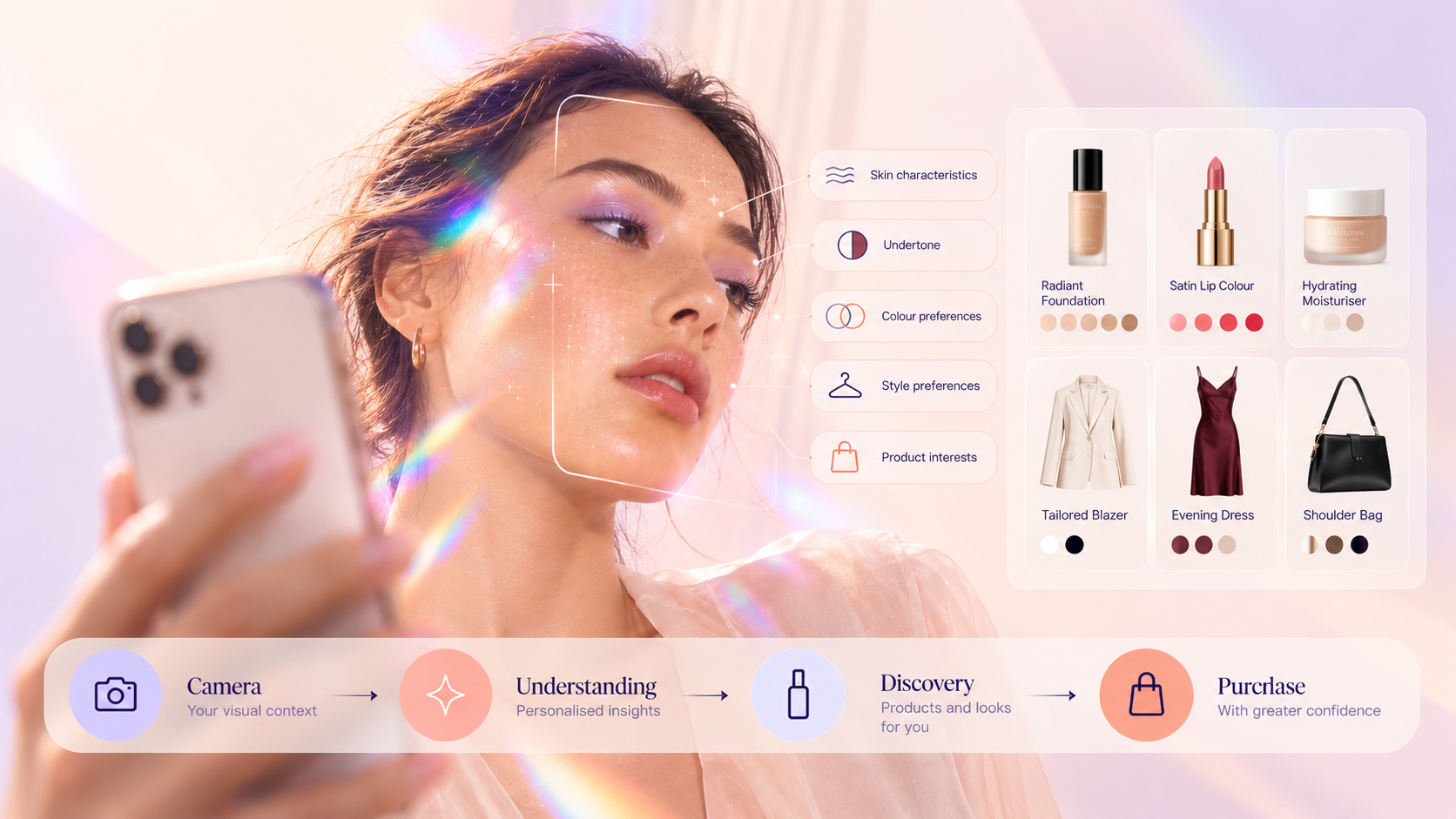
The difference between camera-native commerce and virtual try-on is architectural. A retailer can add a virtual try-on platform or VTO widget to a product page and still run a conventional ecommerce stack. A conventional VTO journey looks like this:
Product page → open camera → try product → close camera → continue shopping
A camera-native journey looks like this:
Scan → understand → discover → try → compare → recommend → build basket → purchase → personalize future visits
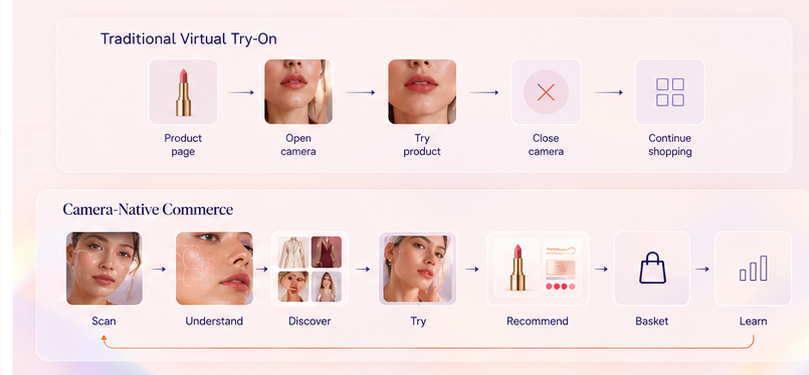
The difference is what happens before and after the image appears on screen. For a closer look at the distinction, see Virtual Try-On vs. Camera-Native Commerce: What’s the Difference?
Ecommerce was built around information shoppers can type or click. Search assumes they know what to ask for. Filters assume they know which attributes matter. Recommendation engines infer taste from past behavior. That works when the decision is objective. It breaks down when the shopper’s real question is “will this work for me?”
Beauty and fashion have a structural version of this problem: the product is standardized, but suitability is personal. A lipstick is the same SKU for everyone who views it. How that shade works on a particular face is not. A moisturizer has one ingredient list, but whether it belongs in someone’s routine depends on their skin, concerns and what they already use.
Retailers have tried to close this gap with more photography, reviews, quizzes, creator videos and longer descriptions. All of it helps. But it still asks the shopper to translate facts about themselves into terms the catalog understands. The camera lets some of that context enter the system directly. It does not replace search, conversation or purchase history. It adds information those signals cannot capture.
Capabilities vary widely, so separate them before comparing vendors.
Virtual try-on. The shopper previews lipstick, foundation, eye makeup, hair color, eyewear or complete looks on themselves. Evaluate realism, tracking stability, shade accuracy, latency and how much of your catalog is supported. See how ARview approaches beauty virtual try-on.
Skin analysis. The camera assesses visible skin characteristics and converts them into structured metrics that inform product or routine recommendations. If a scan produces an impressive report that is not connected to your catalog, you have bought engagement. If the scan feeds products, routines and future visits, you have bought commerce. See ARview’s skin diagnostics and routine builder.
Shade and product matching. Camera signals combine with stated intent. For example, the camera reads undertone and visible skin characteristics, and the shopper says “something lightweight under £35.” The system returns products that satisfy both.
Visual discovery. Shoppers who cannot put their taste into words can show it through interaction, by swiping, comparing and reacting to looks. That preference becomes a usable signal.
Persistent personalization. With consent, structured signals from these interactions can shape what the shopper sees next, including onsite merchandising, CRM and their next visit. This is where much of the long-term value sits, and where many visual-commerce tools stop.
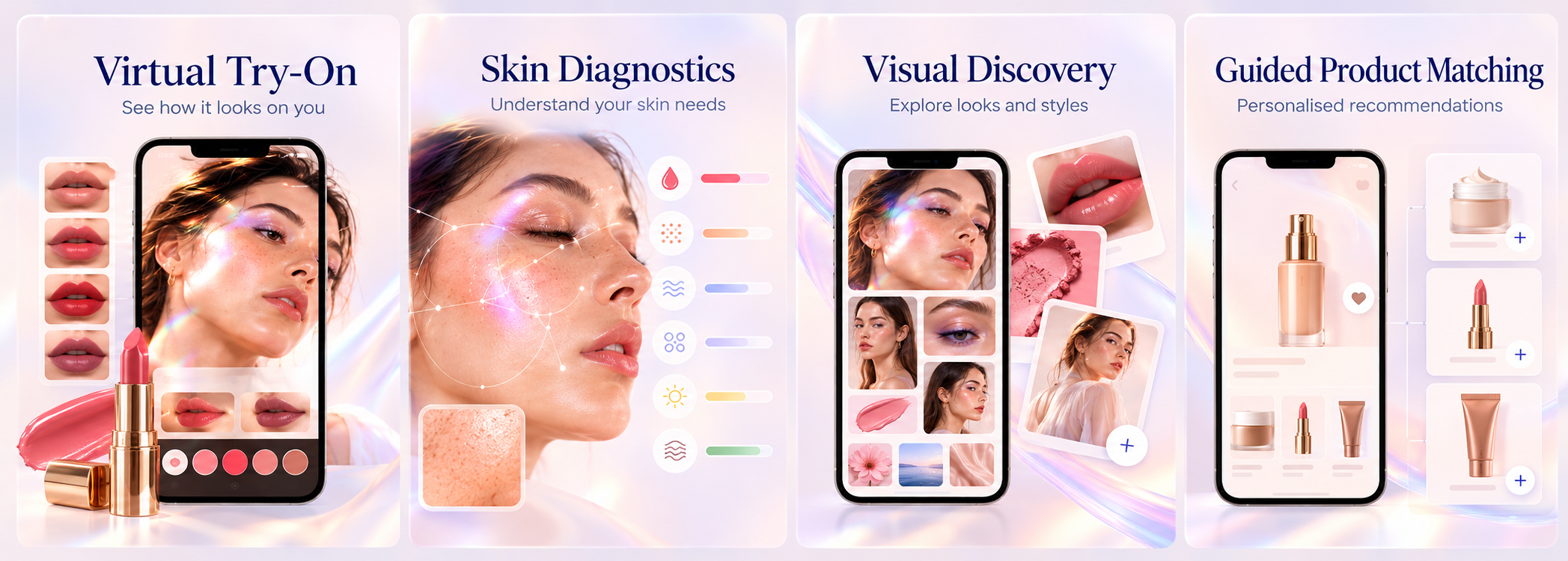
Beauty is a comparatively mature category for camera-native commerce because many use cases center on a well-defined surface and color. Fashion is more complex. Accessories, eyewear, color and style preference can work well, while accurate fit and sizing remain materially more difficult than color or accessory try-on. Buyers should scrutinize validation methodology and performance across their own products, size ranges, devices and customer populations rather than relying on a polished demo.
Most immersive experiences end when the shopper closes them. The retailer learns that someone used try-on, and perhaps which product they tried. The richer information produced during the session can be lost: which shades they rejected, what they compared, which concerns they raised.
A camera-native architecture can turn consented interactions into structured first-party signals: shade and color preferences, skin-profile metrics and stated concerns, products tried, compared and rejected, routine preferences and basket outcomes.
.webp)
Those signals can improve recommendations, CRM, merchandising and service. This is also where camera-native commerce meets agentic commerce. The camera tells the system something about the shopper, and an agent can use that context to determine the appropriate next action.
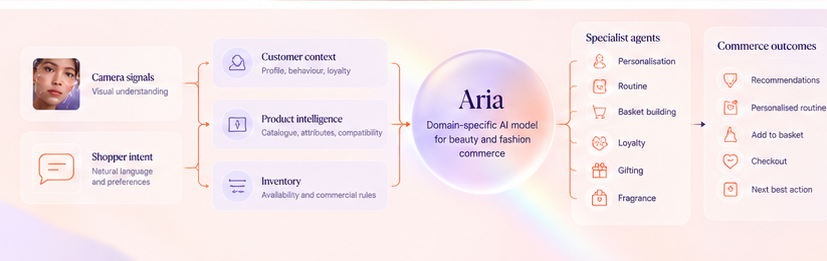
Take a shopper who says “my skin has been dry lately and I want a simple morning routine.” A conversational interface understands the request. A skin scan adds visible characteristics. Product intelligence identifies relevant products and ingredients. Customer context can add previous purchases and known preferences. Inventory confirms what is actually available. The system can then reason across those inputs and build a routine the shopper can buy.
Camera + intent → customer context → product intelligence → reasoning → recommendation → action
Most discussion of camera commerce assumes a phone. Some of the most useful deployments are physical: smart mirrors, beauty-advisor tablets and in-store kiosks.
In store, the camera solves a different problem. Advisors are scarce, product ranges are large, and shoppers who leave without asking for help leave little usable context behind. A camera-led experience can give shoppers guided support, help advisors start from a profile rather than from scratch and, with permission, carry relevant context into the online journey.
That last part is the test. If the profile created in store disappears when the shopper walks out, you have a gadget. If relevant consented context can show up in the next app or web session, you have the foundations of omnichannel commerce.
Camera experiences can process facial images, skin characteristics and other personal information. “We are GDPR compliant” is not a sufficient answer. Ask the vendor to walk you through the data flow from the moment the camera opens to the moment the session ends: what is captured; whether images or video are stored; where processing happens; which derived metrics are retained and for how long; who owns them; how consent and deletion are handled; whether shopper data trains models used for other brands; and what happens to the data if you leave.
Biometric data. Under UK GDPR, not every facial image is automatically special-category biometric data. ICO guidance distinguishes biometric data used for unique identification, which is special-category data, from other image processing. The exact purpose and technical processing matter. Buyers should have their DPO or legal team assess the actual architecture. Where biometric recognition is used, ICO guidance also emphasizes data protection by design and assessment of associated risks, including whether a DPIA is required.
US biometric laws. Requirements vary by jurisdiction. Illinois’ Biometric Information Privacy Act, for example, defines biometric identifiers to include scans of hand or face geometry while excluding photographs themselves.
The EU AI Act. The Act includes specific rules and prohibitions for certain biometric categorization and identification uses. Buyers should establish what a system actually infers or identifies rather than assuming every camera-based AI experience falls into the same regulatory category.
Claims language. Skin analysis used for cosmetic product recommendation should be described carefully and should not casually drift into medical diagnosis or treatment claims. Regulatory treatment depends on functionality and claims, so these should be reviewed for the markets in which the experience operates.
Not every retailer needs a full camera-native architecture today. A standalone virtual try-on platform may be the right call if you want to reduce uncertainty on a narrow, color-led range; have no current plan to use interaction data in CRM or personalization; or are testing shopper appetite before committing to a broader program.
The important question is whether you can grow from there later. Swapping vendors because the first tool became a dead end can be more expensive than choosing an architecture that can expand when the use case proves itself.
Opening the camera is not a commercial outcome. Pick two or three primary metrics, define them before launch and measure them against an appropriate control group.
Use activation, completion and click-through rates as diagnostic metrics to understand why the primary numbers moved, not as headline proof of commercial success. Track the volume and usefulness of consented first-party signals captured as a strategic metric in its own right.
The real pilot question is not “did shoppers use it?” It is “did shoppers who used it make better, more confident purchases?”
Do not pilot the demo. Pilot the system, with your real products, catalog structure, devices and customer journey. Before launch, agree on:
A good pilot tells you whether the system deserves to scale, not just whether the feature works.
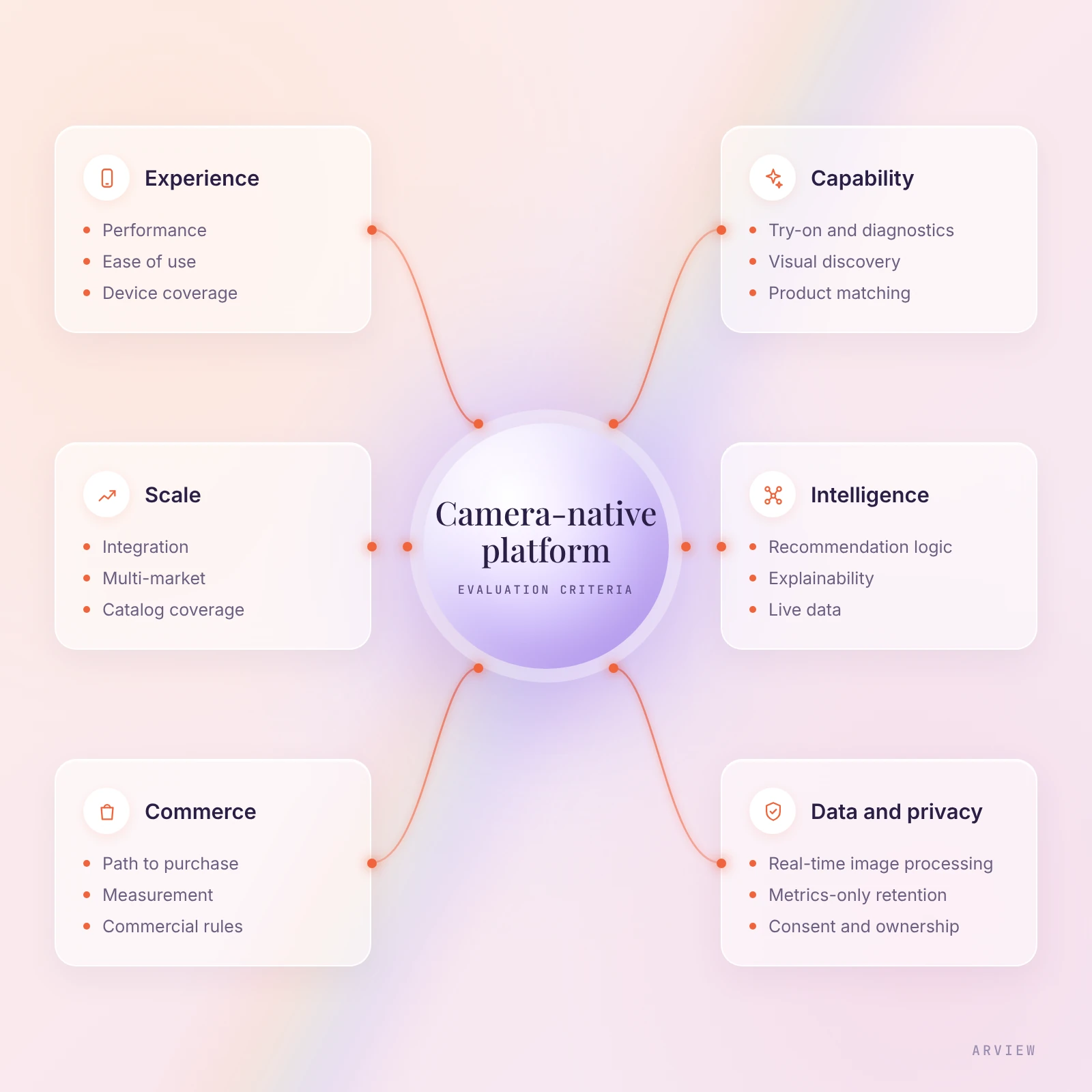
The easy mistake is to buy the visible feature. A beautiful try-on is easy to understand, and a skin scan makes an impressive first impression. The long-term question is what those experiences become part of. The camera can stay a 30-second widget, or it can become a new source of customer context that links discovery, personalization and purchase across channels.
ARview is built around the second architecture. Its Experience Studio combines skin analysis, virtual try-on and guided discovery. Aria, a domain-specific AI model trained on each brand’s own data, powers 8 specialist agents. Together, they connect camera-led experiences with personalization, routine building, basket building, loyalty, gifting and other commerce journeys online and in store.
What is camera-native commerce?
A commerce architecture in which the shopper’s camera, with permission, feeds discovery, skin analysis, virtual try-on, recommendation and purchase. Camera signals can be combined with shopper intent, product data and customer context.
How is it different from virtual try-on?
Virtual try-on lets shoppers preview products on themselves. Camera-native commerce is broader: it connects camera signals to recommendations, customer context and purchase across the wider journey.
Is augmented reality the same thing?
No. AR is a technology that can power experiences such as virtual try-on. Camera-native commerce describes the wider architecture connecting those experiences to commerce.
How is it used in beauty?
Skin analysis, shade matching, virtual makeup and hair-color try-on, routine building, visual discovery and personalized recommendations.
How is it used in fashion?
Virtual try-on for accessories and eyewear, color and style preference capture, visual discovery and guided matching. Accurate fit and sizing remain more complex and should be evaluated separately.
Does it require storing shoppers’ images?
Not necessarily. Camera experiences can process visual information in real time and retain permitted derived metrics rather than the image itself. Verify the exact processing, storage, consent and retention architecture of any platform.
Does it work in physical stores?
Yes. Camera-native experiences can run through smart mirrors, advisor tablets and kiosks. The test is whether relevant consented context can carry into the shopper’s wider online journey.
Does it work with an existing ecommerce stack?
It should. A camera-native platform should connect to ecommerce, catalog, inventory, CRM, loyalty and analytics systems rather than replace the retailer’s core commerce stack.
See how camera-native discovery, skin analysis and virtual try-on can connect to your catalog, customer context and path to purchase.
Book a demo