
1. Virtual try-on is not the same as camera-native commerce
Virtual try-on is a feature. Camera-native commerce is an architecture.
That distinction sounds subtle until you look at how each one actually works.
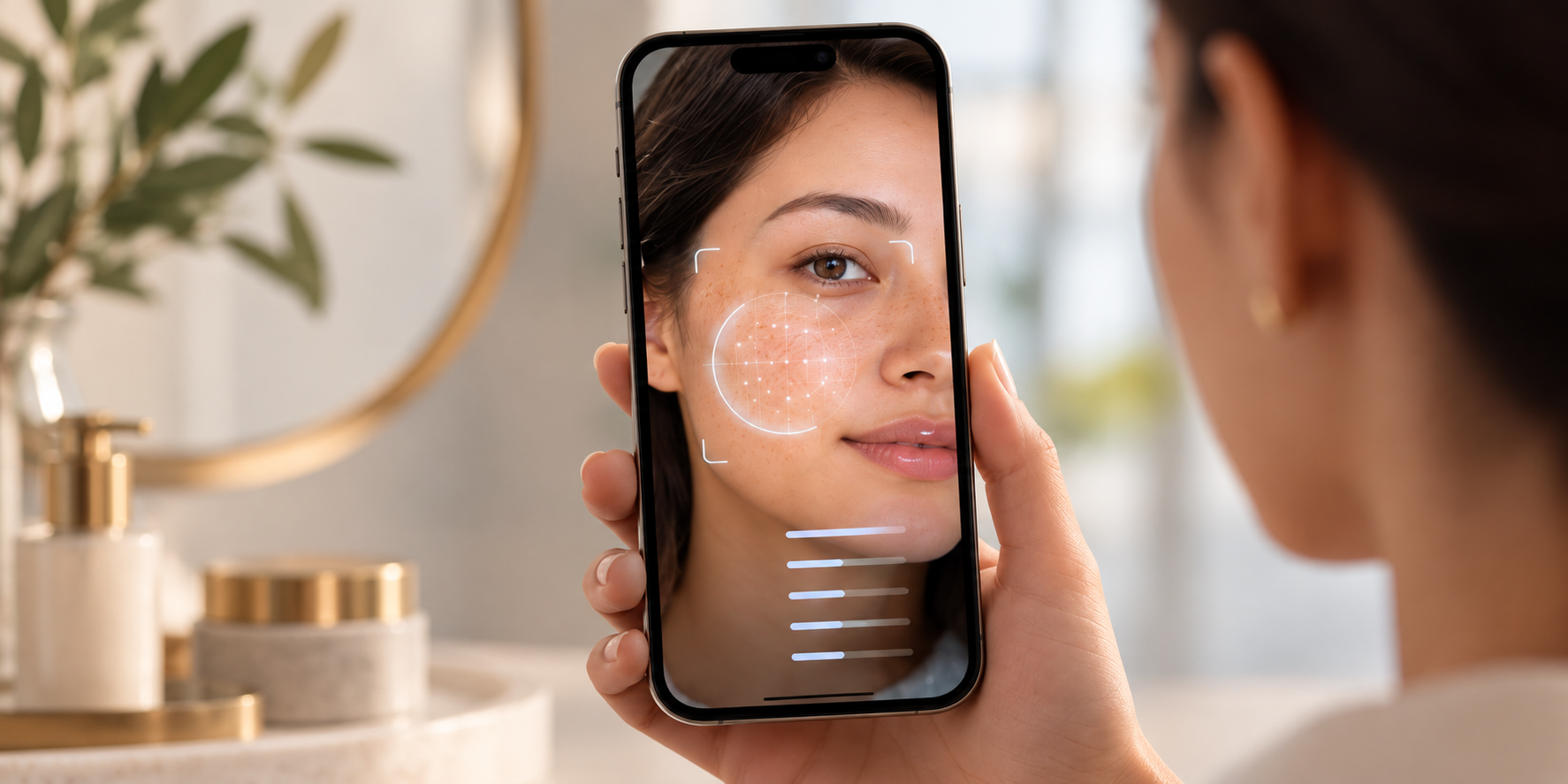
Traditional virtual try-on starts with a product. A shopper selects an item, opens a camera modal to see it on themselves, and closes it again. The camera is a rendering surface, bolted onto the end of a product page.
Camera-native commerce starts with the camera itself, as an input into the shopping journey. What the camera sees and understands can shape discovery, recommendation, try-on, and ultimately what gets purchased, not just how one product looks.
The difference isn't about visual quality. A VTO feature can render beautifully and still be architecturally shallow. The difference is about where the camera sits in the system and what happens with what it sees.
2. What makes an experience genuinely camera-native?
Four properties separate a real camera-native architecture from a try-on feature with good PR:
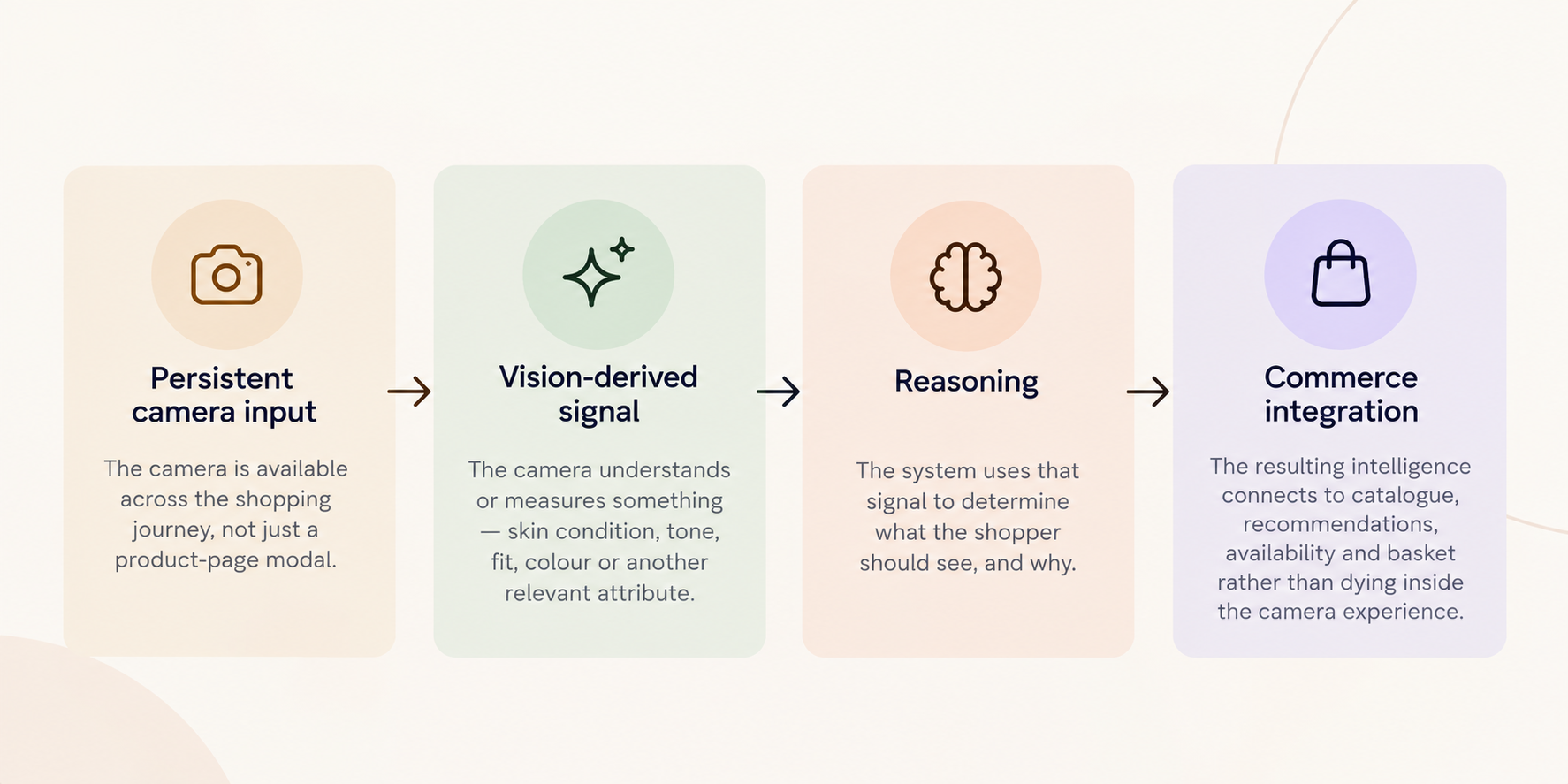
Persistent camera input. The camera is available across the shopping journey, not isolated inside a single product-page modal that opens and closes.
Vision-derived signal. The camera actually understands or measures something: skin condition, tone, fit, colour, another relevant attribute, rather than only rendering an overlay on top of what's already there.
Reasoning. The system uses that signal to answer a real question: what should this shopper see, and why?
Commerce integration. The resulting intelligence connects to catalogue, recommendations, availability, and basket, rather than dying inside the camera experience the moment it closes.
Under this framework, a tool needs all four to qualify as camera-native commerce. Tools may provide one, several, or all four, which is why the label alone tells a retailer very little about the underlying architecture.
3. The spectrum from try-on to commerce
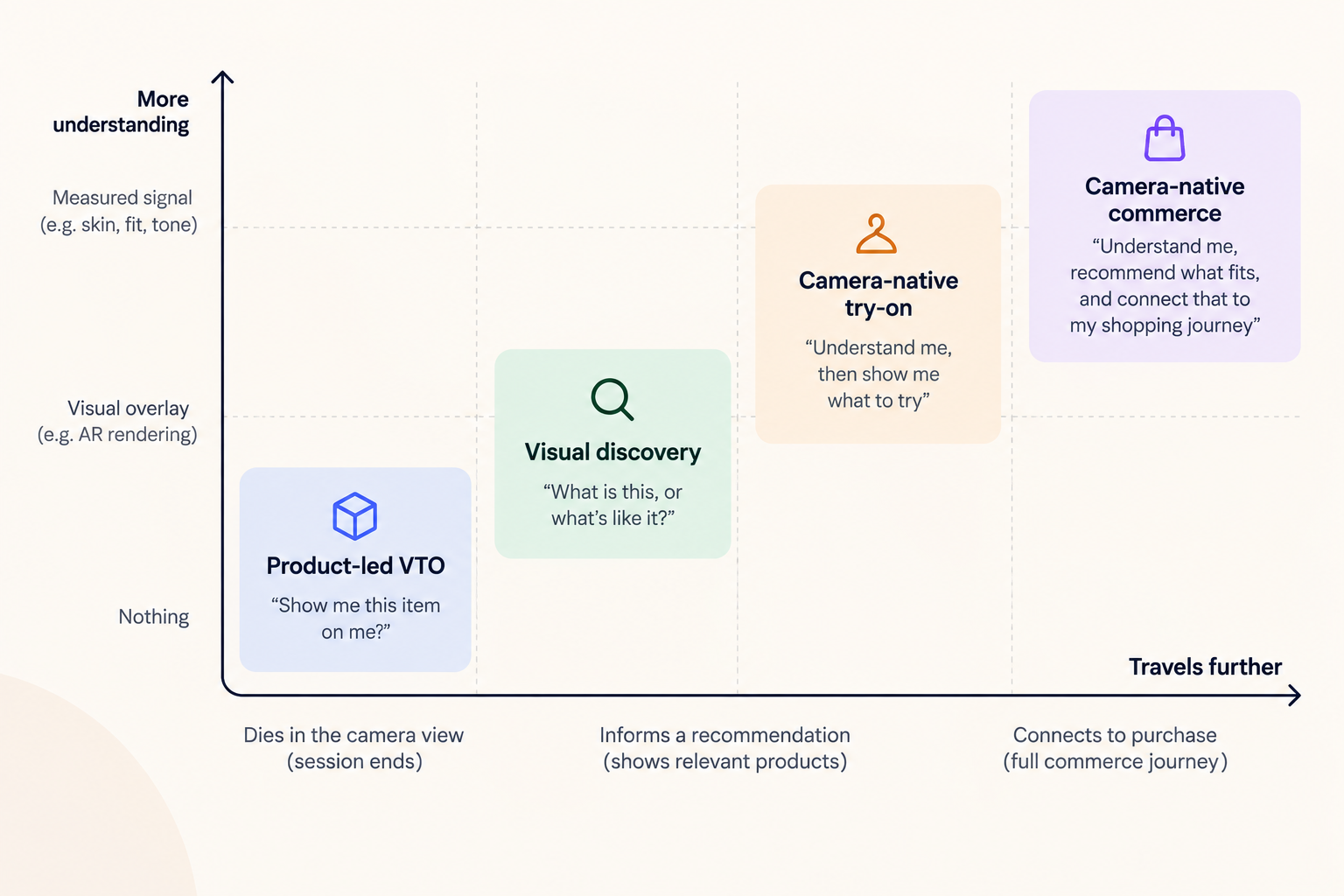
Rather than a single maturity ladder, it's more accurate to think of this as two questions a tool has to answer:
- How well does it understand the shopper? (nothing → visual overlay → measured signal)
- How far does that understanding travel? (dies in the camera view → informs a recommendation → connects to the full purchase path)
Four recognisable patterns fall out of that:
PatternWhat it answersWhat happens after the camera opensProduct-led VTO"Show me this item on me"Nothing. The session ends when the modal closes.Visual discovery"What is this, or what's like it?"Returns similar or matching products; camera isn't persistent.Camera-native try-on"Understand me, then show me what to try"Vision-derived signal informs which products are surfaced.Camera-native commerce"Understand me, recommend what fits, and connect that to my shopping journey"Signal, reasoning and commerce integration work together across the session.
Framed this way, a tool's position isn't a single score. It's a combination of how much it understands and how far that understanding is allowed to travel through the rest of the commerce stack.
4. Four architectures behind camera-based shopping
Camera-based shopping tools can be built around several functional patterns, each solving a different part of the journey:
- Rendering-first tools focus on making the try-on visual as realistic as possible: accurate colour, lighting, fit, with limited reach beyond that single interaction.
- Discovery-first tools focus on visual search: point a camera or upload an image, get matching or similar products back. The camera is a query, not a persistent presence.
- Infrastructure/SDK tools provide the underlying camera and AR capability that other platforms build social or try-on experiences on top of. The camera infrastructure may be powerful, but the commerce logic sits elsewhere.
- Camera-native commerce architectures are built so that what the camera sees feeds directly into recommendation logic and the purchase path, treating the camera as a standing input rather than a one-off feature.
None of these patterns is "wrong". They're solving different problems. The question for a retailer isn't which pattern is best in the abstract, it's which one matches what you actually need the camera to do.
5. How to tell which pattern a tool you're evaluating actually uses
A short diagnostic, regardless of what a vendor calls their product:
- Does the camera open once per product, or stay available across the session?
- Does it only render an image over what's already there, or does it measure something about the shopper?
- Does what it learns about the shopper change what gets recommended next, or does the insight stay inside the camera view?
- If a shopper tries something on, does that connect to catalogue, stock, and checkout, or does the journey have to restart from a product page?
The pattern of answers matters more than the number of yeses. A retailer primarily buying visualisation capability should expect different answers from one trying to connect diagnostics, recommendations, and purchase. The purpose of the questions is to expose the architecture underneath the product language.
6. Which architecture does your use case actually require?
This is the part vendors rarely say out loud: not every retailer needs the most sophisticated end of the spectrum.
- If the problem is simply "help shoppers visualise this SKU," a well-executed VTO feature may be enough, and cheaper and faster to deploy than a full architecture.
- If the problem is "help shoppers discover what suits them," you need camera intelligence connected to recommendation logic. Visual discovery alone won't close that gap.
- If the problem is "connect discovery, diagnostics, try-on and purchase into one journey," you're evaluating a camera-native commerce architecture, and feature-level VTO tools won't get you there no matter how realistic the rendering is.
Matching the architecture to the actual problem, not the most advanced option available, is usually the right call.
7. What camera-native commerce looks like in practice
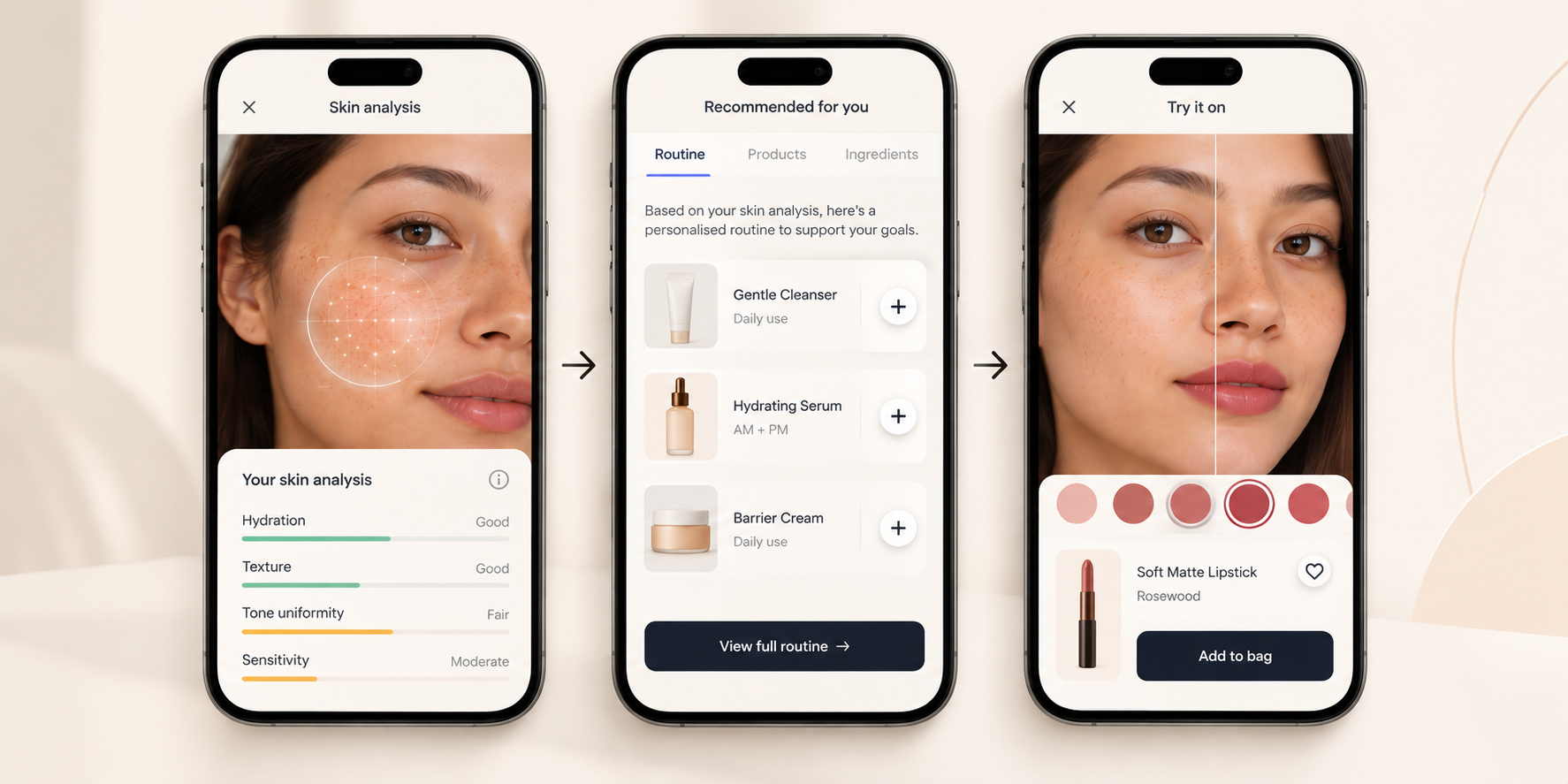
Consider a beauty journey that begins with the shopper rather than a product page.
The shopper opens the camera and completes a skin diagnostic. That interaction produces vision-derived signals about their skin rather than simply displaying a product on their face. Those signals can then be interpreted against product formulations, ingredients, catalogue data, and the shopper's wider context to determine which products or routines are relevant.
The shopper can move from diagnosis into personalised discovery, explore recommended products, use virtual try-on where relevant, and continue into basket and purchase without the intelligence generated by the camera disappearing between each step.
ARview is one example of this architecture in beauty and fashion. Its camera experiences connect the Skin Diagnostics and Try-On agents with Aria, its domain-specific AI model, alongside its Personalisation and Basket Building agents, product catalogue intelligence, and the wider purchase journey.
8. Where camera-native commerce goes next
The evolution here isn't "bad try-on gets replaced by better try-on." It's a shift in what the camera is inside the shopping journey:
camera as renderer → camera as input → camera as intelligence → camera as commerce interface
That trajectory points toward agents that hold context across a session, act on first-party signal the camera provides, and orchestrate the rest of the commerce stack around it, not just render a prettier overlay.